Leave Your Message

What Is the Best Cable Router to Buy in 2026?

Choosing the best Cable Router in 2026 means looking beyond the speed printed on the box. A router must work with your internet provider, support your plan, and deliver a steady connection where you actually use your devices. Those details matter.

This guide compares the practical features that shape everyday performance, including DOCSIS support, Wi-Fi coverage, Ethernet ports, and setup options. It also explains when a modem-router combination makes sense and when separate devices offer more flexibility. A fast wireless standard cannot fix a weak signal through thick walls, and a high-speed plan may not help if your equipment is outdated. Small details count.

There is no single best choice for every home. A compact apartment with a few connected devices has different needs from a busy household streaming video, gaming, and joining work calls at once. Provider compatibility deserves careful checking, too; not every device works with every cable service. That part is easy to overlook.

The recommendations should help you compare options by real needs, not marketing claims alone. Consider the purchase price, any rental savings, firmware support, and the cost of replacing older equipment. Some specifications look impressive but may not matter for your plan. I would still check your provider’s current approved-device list before buying. A little doubt is useful.
What Is the Best Cable Router to Buy in 2026?

Understanding Cable Routers and DOCSIS Standards in 2026

A cable router may mean a modem-router gateway, or a Wi-Fi router paired with a separate cable modem. Check which device you need before buying. DOCSIS is the cable modem standard that determines how the device communicates with your provider’s network.

CableLabs’ DOCSIS 4.0 technical overview describes potential speeds of up to 10 Gbps downstream and 6 Gbps upstream. These are theoretical limits, not speeds every household will receive. Local network upgrades, your service plan, and shared cable capacity all matter. Real-world performance can be less impressive.

For many homes, DOCSIS 3.1 remains a practical choice when it supports the subscribed plan and is approved by the provider. DOCSIS 4.0 may offer more headroom, especially for uploads, but only where the network supports it. Wi-Fi coverage matters too: a fast modem cannot fix a weak signal behind two walls. Look for clear provider compatibility, enough Ethernet ports, and wireless coverage suited to your floor plan. It is easy to overbuy.

Tips: Check your provider’s approved-device list and upload speeds before choosing. If possible, place the gateway in an open, central spot. Compare actual plan limits with CableLabs’ published DOCSIS capabilities; the larger number on a box is not a promise.

Checking Compatibility With Your Internet Plan and Provider

A cable router must match both your service tier and your provider’s approved equipment list. Check the exact model. Some providers approve only specific modem-router combinations, even when another device supports the same cable standard. Also confirm whether you need a built-in cable modem or a separate modem; a Wi-Fi router alone does not connect to coaxial service.

Speed numbers need context. CableLabs’ DOCSIS 3.1 specifications describe theoretical capacity of up to 10 Gbps downstream and 1 Gbps upstream, not the speed a household will receive. The FCC’s 2024 Section 706 Report set its fixed-broadband benchmark at 100 Mbps download and 20 Mbps upload. Your actual plan may be faster or slower. Match the router’s supported speeds to your subscribed tier, and check whether your provider requires particular modem capabilities or channel support.

This is where shopping gets annoyingly specific. Compare the provider’s compatibility page against the device’s full model number, not just its product name. Then review the plan’s upload speed, data cap, and any rental or activation fees; FCC broadband labels are designed to disclose plan speeds, fees, and data allowances. A fast-looking box can still be a poor fit. Small detail, big impact. If the provider list is unclear, ask support to confirm compatibility before buying.

Comparing Speed, Wi-Fi Coverage, and Connected-Device Capacity

A cable router’s speed rating should match both your internet plan and your household’s actual use. Check that its modem is approved for your service and supports the plan’s download speed. A high Wi-Fi number on the box does not guarantee faster video calls or downloads. Test near the router and in the room where you stream or work; walls and neighboring networks can change results. That matters.

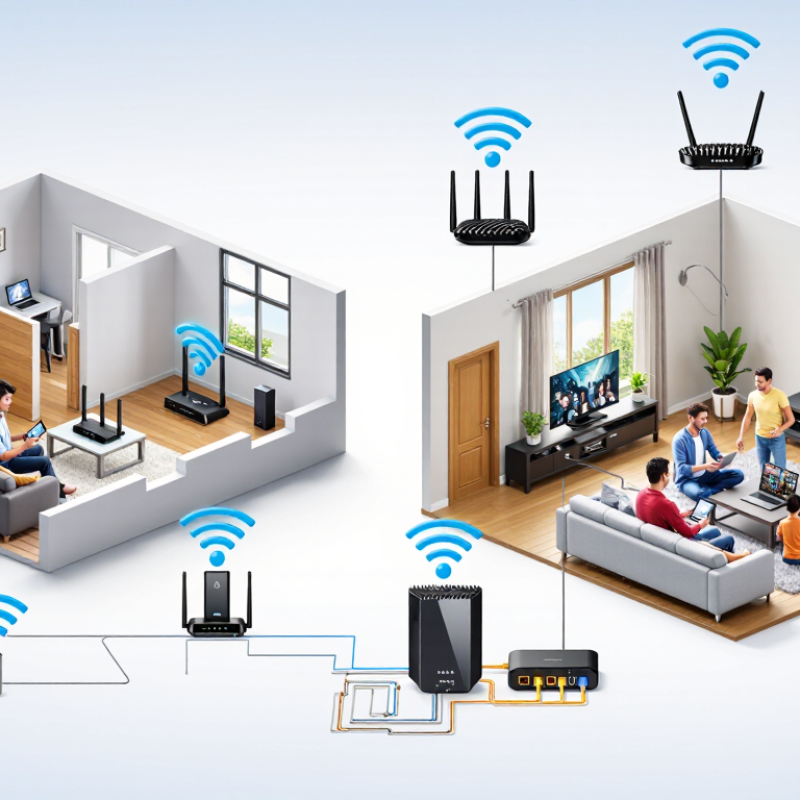
Coverage depends on more than square footage. A router placed behind a television or inside a cabinet may struggle to reach distant rooms. Put it in an open, central spot, preferably above floor level. For a two-story home, check performance upstairs and at the far end of the house. Some routers support newer Wi-Fi bands, but devices must support them too. Paying for features your devices cannot use may bring little benefit.

Connected-device capacity deserves a closer look. Count phones, computers, cameras, speakers, and smart plugs, then consider how many are active at once. A home with many idle devices can behave differently from one running several video streams and large downloads. I would not choose by the advertised device limit alone; manufacturers may measure capacity under different conditions. Compare independent testing when available, and leave room for future devices. A little headroom helps.

What Is the Best Cable Router to Buy in 2026? Comparing Speed, Wi-Fi Coverage, and Connected-Device Capacity

A practical, brand-neutral comparison of cable modem-router configurations for different home sizes and internet needs.

Configuration Cable Standard Wi-Fi and Example Radio Rate Ethernet to Look For Coverage and Best Use Active-Device Planning Estimate
Value pick
Entry-level combination unit
DOCSIS 3.1 Wi-Fi 6; a 2-stream, 80 MHz 5 GHz link can have a theoretical PHY rate of about 1.2 Gbps. Gigabit Ethernet ports are suitable for many plans up to 1 Gbps, subject to the unit’s specifications and ISP provisioning. Best for a smaller home, moderate usage, and a limited number of demanding simultaneous activities. About 10–20 active devices for a typical mix of browsing, streaming, and video calls.
Best balance for most homes
Midrange combination unit
DOCSIS 3.1 Wi-Fi 6; look for a capable multi-stream design. The advertised combined radio rate is not the speed a single device will receive. A 2.5 GbE port can help with multi-gigabit wired connections when supported by the modem, plan, and connected equipment. A strong general-purpose choice for a typical home with several simultaneous streams, gaming, and work calls. About 20–35 active devices, depending on signal quality and what each device is doing.
Busy home or 6 GHz priority
Tri-band combination unit
DOCSIS 3.1 Wi-Fi 6E adds the 6 GHz band. A 2-stream, 160 MHz 6 GHz link can have a theoretical PHY rate of about 2.4 Gbps. Prefer a model with 2.5 GbE where multi-gigabit wired networking is needed. Useful for compatible nearby devices that benefit from an additional band. The 6 GHz signal generally has less reach through walls than lower-frequency Wi-Fi bands. About 25–45 active devices in a well-positioned setup; device mix and airtime demand matter more than the count alone.
Future-ready premium
Latest-generation combination unit
DOCSIS 4.0, where supported by the ISP Wi-Fi 7; a 2-stream, 320 MHz 6 GHz link can reach a theoretical PHY rate of about 5.8 Gbps under supported conditions. Choose ports that match the wired network and service tier; multi-gigabit ports are important if you plan to use multi-gig speeds. Best for early DOCSIS 4.0 availability, newer Wi-Fi 7 devices, and demanding local networking. Availability and benefits depend on the ISP and region. About 30–50 active devices as a planning estimate; more devices may connect, but performance depends on their activity and the network layout.
Large or multi-level home
Modem-router plus mesh system
DOCSIS 3.1 is widely deployed; DOCSIS 4.0 is an option only where the ISP supports it. Wi-Fi 6, 6E, or 7 can work; mesh nodes address weak-signal areas more directly than choosing a router by its advertised top speed alone. Wired Ethernet backhaul between mesh nodes can improve consistency when suitable cabling is available. Best when distance, floors, or walls cause dead zones. Place nodes with a clear, reliable connection to the main unit. About 25–50 active devices across the home, depending on the mesh system, placement, and traffic load.

Buying guidance: For most households, a DOCSIS 3.1 unit with Wi-Fi 6 and suitable Ethernet ports is a balanced starting point. Choose DOCSIS 4.0 only after confirming that the ISP supports and approves the specific modem-router configuration.

How to read the figures: Wi-Fi PHY rates are theoretical link rates, not expected internet speed tests. Active-device figures are practical planning estimates, not manufacturer limits or standards-based guarantees. Actual coverage and performance vary with building materials, interference, client devices, service tier, and network activity.

Assessing Security, Ports, Features, and Long-Term Value

A cable router should match your internet plan and your home’s actual needs. If it combines a modem and router, check that its modem standard is supported by your internet provider. A device that works today may not suit a future plan, so confirm compatibility before buying. Security deserves equal attention. Look for WPA3 support, automatic firmware updates, and a clear way to manage connected devices. Updates matter. A strong password helps, but it cannot replace fixes for newly discovered vulnerabilities. If the manufacturer does not state how long it will provide updates, treat that as a real drawback.

Ports shape everyday use more than glossy feature lists suggest. Count the wired connections you need for a desktop, television, or network storage device; some models offer only a few gigabit Ethernet ports. A 2.5-gigabit port can help with faster service or local transfers, but only when the connected equipment supports it. Extra features, such as parental controls or guest Wi-Fi, are useful when they are easy to configure and maintain. Long-term value includes power use, warranty terms, update support, and replacement cost—not just the checkout price. I would not pay much more for speeds my devices cannot use. Still, estimating future needs is imperfect; household habits change, and no specification sheet can predict them.

Matching Cable Router Types to Different Household Needs

What Is the Best Cable Router to Buy in 2026?
Matching Cable Router Types to Different Household Needs

The best cable router depends on your home, internet plan, and daily habits. For a small apartment with one or two users, a modem-router combo can save space and simplify setup. Check that its modem standard is supported by your internet provider. That check matters more than a long feature list.

Larger households may benefit from a separate modem and router. Separate devices are easier to replace individually, though they take more room and can mean extra setup. If several people stream video or join work calls at once, look for a router with enough capacity and useful wired ports. Gamers or desktop users may prefer an Ethernet connection for steadier performance. Thick walls and distant bedrooms can still weaken Wi-Fi, even with expensive equipment. I’d measure coverage before assuming a higher price solves it.

Tips: Confirm compatibility with your provider, compare the router’s coverage with your floor plan, and check return terms. Keep the device in an open, central spot—not behind a television. Your home’s layout may surprise you.

What Is the Best Cable Router to Buy in 2026?

Suggested cable internet plan speeds by household use

These are practical planning estimates, not guaranteed performance levels. Choose a cable router or gateway that supports your provider’s service tier and DOCSIS requirements; actual speeds depend on your plan, Wi-Fi conditions, and simultaneous usage.